- Name
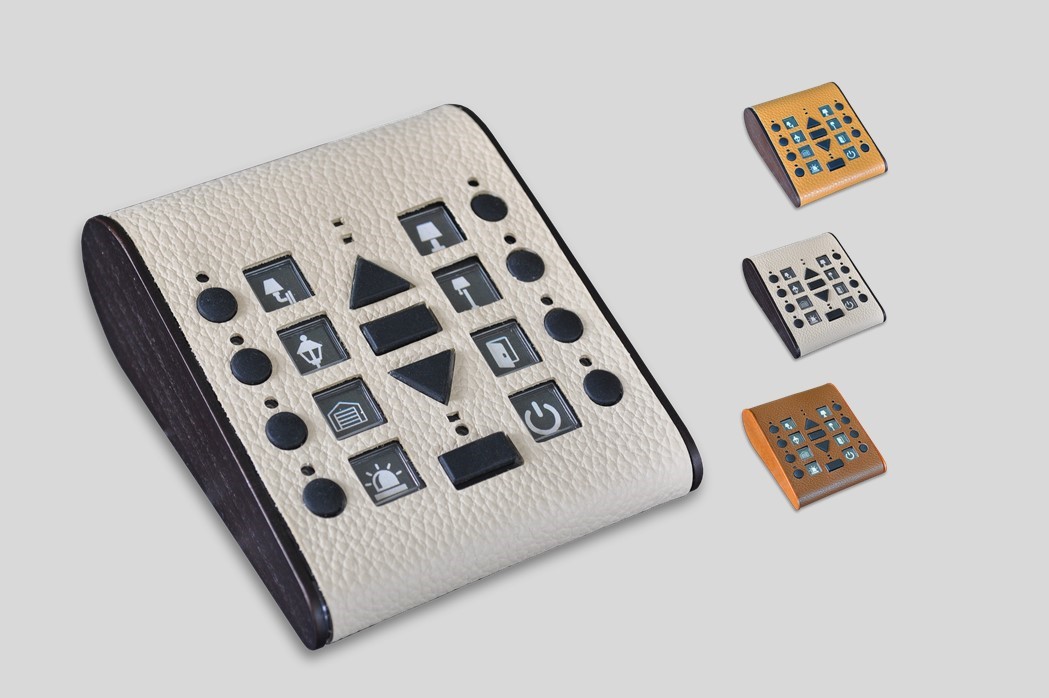
- Z-Wave remote control (aka RemSwiid)
- Brand
- Swiid
- Features
- Feature Values Z-Wave Scene Type
- Documents
- Category Description File Manual_Primary_Lang
- Role type
- ROLE_TYPE_CONTROLLER_PORTABLE
- User icon
- 0x0A00
- Categories
- All Controllers, Handheld Controller
- Product id
- 0x0001
- Device type
- Remote Control - Multi Purpose
- Oem version
- HW: 1 FW: 1.02
- Library type
- CONTROLLER_PORTABLE
- Supports nwi
- Yes
- Installer icon
- 0x0A00
- Z wave version
- 6.51.09
- Frequency plans
- EU: 869.85MHz, 868.40MHz
- Manufacturer id
- 0x0166
- Product type id
- 0x0002
- Long description
- Battery operated hand-held Z-Wave remote control usable either as a primary or as a secondary controller (the latter in the network of another primary Z-Wave controller, e.g. an IP gateway). Can operate up to 8 different groups of Z-Wave devices (maximum 8 devices per group) or activate up to 8 scenes (as a secondary controller). Can create associations between two or more devices which are in the same Z-Wave network. Feedback through 12 LEDs. Covered in genuine leather (4 colours)with real wood (5 tints) and comes with a magnetic wall mounting clip. Works with 2 AA batteries (LR06).
- Hardware platform
- SD3502
- Short description
- This Swiid® remote control - known as RemSwiid™ - is a battery-operated Z-Wave hand-held portable controller, using intercheangeable pictograms to identify the device/scene button
- Product identifier
- SW-ZRC-1
- Countries / regions
- European Union
- Certification number
- ZC10-17115831
- Configuration parameters
- Parameter Number Name Description Format Read-only Size Min Value Max Value Default Value Parameter Values 1
- Supports explorer frames
- Yes
- Supported command classes
- Identifier Name Key Version COMMAND_CLASS_POWERLEVEL
- Controlled command classes
- Identifier Name Key Version COMMAND_CLASS_SWITCH_MULTILEVEL_V3
- Value scene & central scene battery type value aa (lr06) battery quantity value 2 association groups
- Group Number Maximum Nodes Supported End Point ID Description 9
- From to description 1 2 see above 7 function of rem swiid™ device key f 0 = disabled 1 = basic/multilevel switch 7 2 = control central scene 6 3 = control scene activation 6 0 yes 1 0 3 1 from to description 0 3 see above 8 function of rem swiid™ device key g 0 = disabled 1 = basic/multilevel switch 8 2 = control central scene 7 3 = control scene activation 7 0 yes 1 0 3 1 from to description 0 3 see above 9 function of rem swiid™ device key h 0 = disabled 1 = basic/multilevel switch 9 2 = control central scene 8 3 = control scene activation 8 0 yes 1 0 3 1 from to description 0 3 see above 10 send unsolicited battery report on wake up 0 = no 1 = to same node as wake up notification 2 = broadcast to neighbours 0 yes 1 0 2 0 from to description 0 2 see above 11 dimming mode 0 = continues dimming until “stop” command key is pressed 1 = stops dimming when “up” or “down” command key is released 0 yes 1 0 1 0 from to description 0 1 see above 2 function of rem swiid™ device key a 0 = disabled 1 = basic/multilevel switch 2 2 = control central scene 1 3 = control scene activation 1 0 yes 1 0 3 1 from to description 0 3 see above 4 function of rem swiid™ device key c 0 = disabled 1 = basic/multilevel switch 4 2 = control central scene 3 3 = control scene activation 3 0 yes 1 0 3 1 from to description 0 3 see above 5 function of rem swiid™ device key d 0 = disabled 1 = basic/multilevel switch 5 2 = control door locks 4 3 = control scene activation 4 0 yes 1 0 3 1 from to description 0 3 see above 6 function of rem swiid™ device key e 0 = disabled 1 = basic/multilevel switch 6 2 = control central scene 5 3 = control scene activation 5 0 yes 1 0 3 1 from to description 0 3 see above 3 function of rem swiid™ device key b 0 = disabled 1 = basic/multilevel switch 3 2 = control central scene 2 3 = control scene activation 2 0 yes 1 0 3 1 from to description 0 3 see above texts