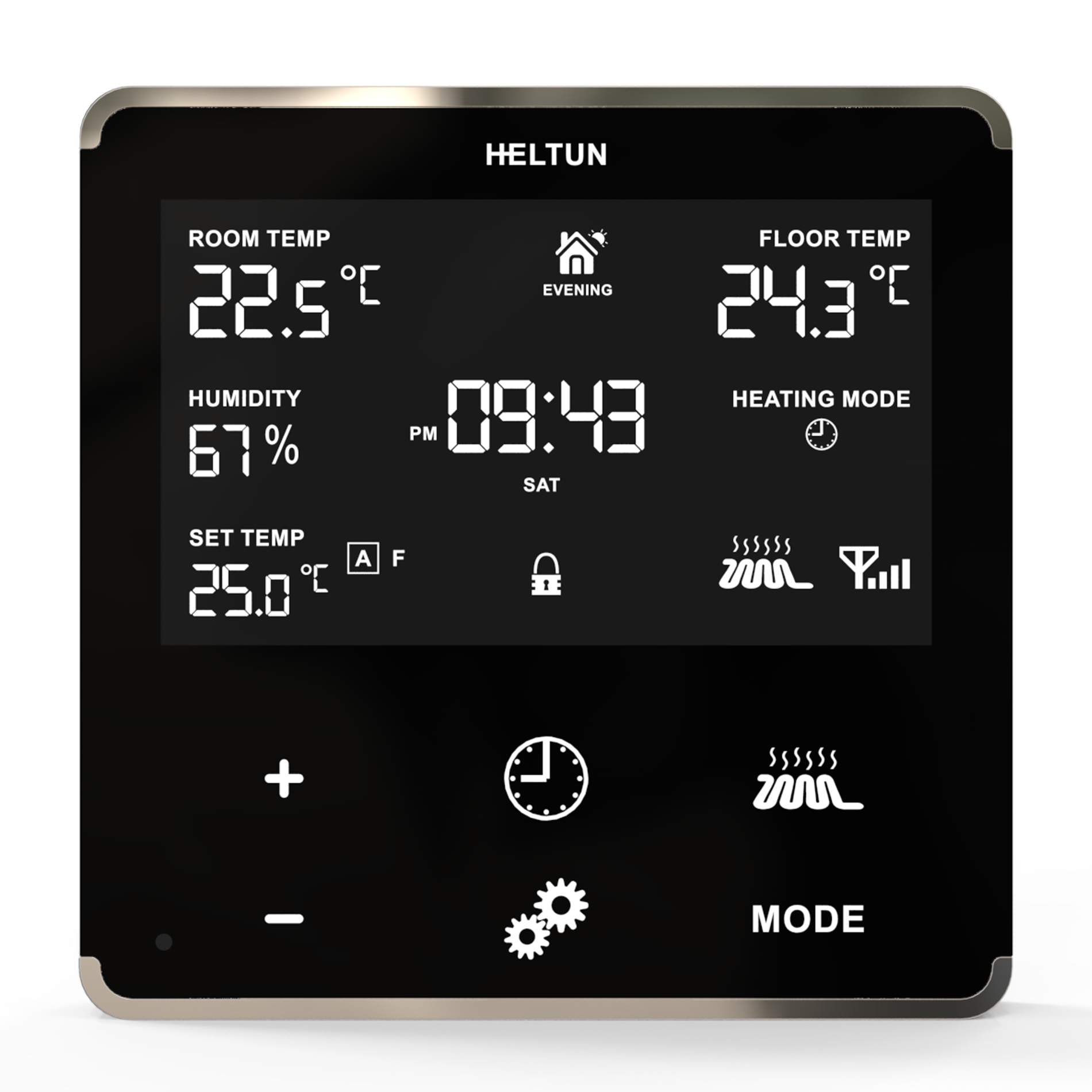
The HELTUN HE-HLS01 is an advanced programmable Z-Wave Plus v2 in-wall high load switch that controls many devices, such as electrical outlets & panels, electric water heaters, radiators, fireplaces, and radiant floor or de-icing systems. It can also provide Internet-connected thermostat functions where a local display and controls are not needed. HELTUN HE-HLS01 fits easily behind outlets or switches in standard electrical junction boxes. Features: • 16A maximum load • 10 scenarios for output control • 6 thermostat operating modes • 4 association groups • External NTC sensor • Real time energy consumption meter • Onboard Real Time Clock (RTC) • 8 safety functions & notifications • Works both with VAC 85-265 and VDC 24-48 • Incorporates HELTUN Advanced Zero-Cross Technology The HELTUN HE-HLS01 is part of an entire line of smart, connected products designed to provide the best technology has to offer without compromising stylish living. Learn more about HELTUN products at www.heltun.com
Want to buy adds it to your wish list and follows HELTUN for updates. I own it adds it to your collection.
The HELTUN HE-HLS01 is an advanced programmable Z-Wave Plus v2 in-wall high load switch that controls many devices, such as electrical outlets & panels, electric water heaters, radiators, fireplaces, and radiant floor or de-icing systems. It can also provide Internet-connected thermostat functions where a local display and controls are not needed. HELTUN HE-HLS01 fits easily behind outlets or switches in standard electrical junction boxes. Features: • 16A maximum load • 10 scenarios for output control • 6 thermostat operating modes • 4 association groups • External NTC sensor • Real time energy consumption meter • Onboard Real Time Clock (RTC) • 8 safety functions & notifications • Works both with VAC 85-265 and VDC 24-48 • Incorporates HELTUN Advanced Zero-Cross Technology The HELTUN HE-HLS01 is part of an entire line of smart, connected products designed to provide the best technology has to offer without compromising stylish living. Learn more about HELTUN products at www.heltun.com
Hardware platform
ZGM130
Short description
Advanced Programmable Z-Wave Plus v2 In-Wall High Load Switch on the Z-Wave 700 platform. With 16 Amp load capacity, it is a perfect addition to any circuit breaker panel. Fits easily behind outlets or switches in standard electrical junction boxes. It can also provide Internet-connected thermostat functions where a local display and controls are not needed.
Product identifier
HE-HLS01
Countries / regions
India, Malaysia, Singapore, United Arab Emirates, Brazil, Russian Federation, Australia, Japan, China, European Union, South Africa, Chile, Republic of Korea, Israel, United States of America, Hong Kong
Supports smart start
Yes
Certification number
ZC12-20070081
Radio range z wave (m)
40
Configuration parameters
Parameter Number Name Description Format Size Min Value Max Value Default Value Parameter Values 4
Supports explorer frames
Yes
Supported command classes
Identifier Name Key Version COMMAND_CLASS_CONFIGURATION_V4
Supported multilevel sensors
Multilevel Sensor Type Air temperature
Supported notification types
Notification Type Event / State Heat Alarm
Supported / controlled meter types
Meter Type Rate Type Description Electric meter
Value power stealing (hard wired 24 v) mains powered (120 v/240 v) switch load capacity watts value 4000 switch load capacity current value 16 a neutral wire required firmware updatable value updatable by consumer by rf switch type value dry contact thermostat hvac systems supported value heat only thermostat modes value heat dry air auto changeover energy save heat away association groups
Group Number Maximum Nodes Supported End Point ID Group Name Profile Description 4
Similar Thermostat
Current-generation and recently-released alternatives in the same category.
From to description 0 0 switch off auto correction 1 0 if the device is connected to a z wave gateway, the time and day will be periodically polled and corrected from the gateway 5 weekday week day. allows manually adjustment of the day of the week in case the he hls01 is not connected to any z wave gateway or the parameter 04 (auto correction) is set to 0. 3 1 1 7 1 from to description 1 0 monday 2 0 tuesday 3 0 wednesday 4 0 thursday 5 0 friday 6 0 saturday 7 0 sunday 6 hour time hour. allows manually adjustment of hours for internal clock in case the he hls01 is not connected to any z wave gateway or the parameter 04 (auto correction) is set to 0. 2 1 0 23 0 from to description 0 23 this parameter allows manual adjustment of time in hours (24 hours). 17 overheat protection level overheat protection & notification. you can define the maximum limit of temperature, reaching which the device will automatically switch off the load and send “overheat detected” notification to the gateway. the factory default value is 60 in °c scale and 140 in °f scale. 2 2 0 248 60 from to description 0 0 disable the functionality 1 248 the value of this parameter can be set from 1 to 120 in °c scale mode or from 32 to 248 in °f scale mode. 3 output mode output no/nc mode. the device can operate in normal open (no) mode and in normal close (nc) mode. 3 1 0 1 0 from to description 1 0 the output will be powered in off state and will be no voltage on output when the device is in on state. 0 0 the device switch operates in no mode and there is no voltage on output when the device is in off state. the output will be powered when device goes to on state. 11 temperature report interval temperature sensor consecutive report interval. this parameter defines the interval between consecutive reports of temperature sensor reading to the gateway. note: if the sensor readings change, the device will send the report to the gateway regardless of this parameter value. in order not to increase traffic on your network, it is not recommended to reduce the value of this parameter. we recommend reducing the value of this parameter only in case of poor connection, when reports from the device does not always reach the gateway. 2 1 1 120 10 from to description 1 120 the value can be adjusted from 1 to 120 minutes 131 load on notification the actual parameter number is 31 when the device is in the 'binary switch' mode. load switched on notification. if this function is enabled the device will send “ac mains re connected” notification to the gateway each time when the relay output state changes to on. note: this function can be useful for informing in case of automatic control of the load by schedule or scenario. 3 1 0 1 0 from to description 0 0 disable sending the notification 1 0 enable sending the notification 132 load off notification the actual parameter number is 32 when the device is in the 'binary switch' mode. load switched off notification. if this function is enabled the device will send “ac mains disconnected” notification to the gateway each time when the relay output state changes to off. note: this function can be useful for informing when the device automatically switches the output off because of emergency case or in case of automatic control of the load by schedule or scenario. 3 1 0 1 1 from to description 0 0 disable sending the notification 1 0 enable sending the notification 138 s1 input hold control mode the actual parameter number is 38 when the device is in the 'binary switch' mode. load switched on notification. 3 1 0 3 2 from to description 2 0 momentary switch: when the button on switch connected to external input is held, (key closed) the relay output state is on, as soon as the button is released (key opened) the relay output state changes to off. 3 0 reversed momentary switch: when the button on switch connected to external input is held, the relay output state is off, as soon as the button is released the relay output state changes to on. 0 0 hold function is disabled 1 0 operate like click (the parameter 39) 31 load error notification parameter only for 'thermostat' device type: load error notification. the device can send the “load error” notification to the gateway when the relay is on but there is no power consumption (meaning possible problems with the heating system). note: the function works only if the device is ac powered. 3 1 0 1 0 from to description 0 0 disable sending the notification 1 0 disable sending the notification 23 reserved parameters from 23 to 30 are reserved by the manufacturer. setting this parameter will have no impact on dut functionality. 2 4 0 4294967295 0 from to description 0 4294967295 parameter reserved by the manufacturer. setting this parameter will have no impact on dut functionality. 45 monday night temp parameter only for 'thermostat' device type: monday night temperature, value x10 2 2 10 1100 180 from to description 10 1100 monday night temperature value 46 tuesday morning temp parameter only for 'thermostat' device type: tuesday morning temperature, value x10 2 2 10 1100 240 from to description 10 1100 tuesday morning temperature value 47 tuesday daytime temp parameter only for 'thermostat' device type: tuesday day temperature, value x10 2 2 10 1100 200 from to description 10 1100 tuesday day temperature value 48 tuesday evening temp parameter only for 'thermostat' device type: tuesday evening temperature, value x10 2 2 10 1100 230 from to description 10 1100 tuesday evening temperature value 49 tuesday night temp parameter only for 'thermostat' device type: tuesday night temperature, value x10 2 2 10 1100 180 from to description 10 1100 tuesday night temperature value 54 thursday morning temp parameter only for 'thermostat' device type: thursday morning temperature, value x10 2 2 10 1100 240 from to description 10 1100 thursday morning temperature value 50 wednesday morning temp parameter only for 'thermostat' device type: wednesday morning temperature, value x10 2 2 10 1100 240 from to description 10 1100 wednesday morning temperature value 55 thursday daytime temp parameter only for 'thermostat' device type: thursday day temperature, value x10 2 2 10 1100 200 from to description 10 1100 thursday day temperature value 51 wednesday daytime temp parameter only for 'thermostat' device type: wednesday day temperature, value x10 2 2 10 1100 200 from to description 10 1100 wednesday day temperature value 52 wednesday evening temp parameter only for 'thermostat' device type: wednesday evening temperature, value x10 2 2 10 1100 230 from to description 10 1100 wednesday evening temperature value 53 wednesday night temp parameter only for 'thermostat' device type: wednesday night temperature, value x10 2 2 10 1100 180 from to description 10 1100 wednesday night temperature value 56 thursday evening temp parameter only for 'thermostat' device type: thursday evening temperature, value x10 2 2 10 1100 230 from to description 10 1100 thursday evening temperature value 57 thursday night temp parameter only for 'thermostat' device type: thursday night temperature, value x10 2 2 10 1100 180 from to description 10 1100 thursday night temperature value 58 friday morning temp parameter only for 'thermostat' device type: friday morning temperature, value x10 2 2 10 1100 240 from to description 10 1100 friday morning temperature value 59 friday daytime temp parameter only for 'thermostat' device type: friday day temperature, value x10 2 2 10 1100 200 from to description 10 1100 friday day temperature value 60 friday evening temp parameter only for 'thermostat' device type: friday evening temperature, value x10 2 2 10 1100 230 from to description 10 1100 friday evening temperature value 61 friday night temp parameter only for 'thermostat' device type: friday night temperature, value x10 2 2 10 1100 180 from to description 10 1100 friday night temperature value 62 saturday morning temp parameter only for 'thermostat' device type: saturday morning temperature, value x10 2 2 10 1100 240 from to description 10 1100 saturday morning temperature value 63 saturday daytime temp parameter only for 'thermostat' device type: saturday day temperature, value x10 2 2 10 1100 200 from to description 10 1100 saturday day temperature value 64 saturday evening temp parameter only for 'thermostat' device type: saturday evening temperature, value x10 2 2 10 1100 230 from to description 10 1100 saturday evening temperature value 65 saturday night temp parameter only for 'thermostat' device type: saturday night temperature, value x10 2 2 10 1100 180 from to description 10 1100 saturday night temperature value 66 sunday morning temp parameter only for 'thermostat' device type: sunday morning temperature, value x10 2 2 10 1100 240 from to description 10 1100 sunday morning temperature value 67 sunday daytime temp parameter only for 'thermostat' device type: sunday day temperature, value x10 2 2 10 1100 200 from to description 10 1100 sunday day temperature value 68 sunday evening temp parameter only for 'thermostat' device type: sunday evening temperature, value x10 2 2 10 1100 230 from to description 10 1100 sunday evening temperature value 69 sunday night temp parameter only for 'thermostat' device type: sunday night temperature, value x10 2 2 10 1100 180 from to description 10 1100 sunday night temperature value 41 night start time parameter only for 'thermostat' device type: night start time. format: hhmm. 2 2 0 2359 2300 from to description 0 2359 night start time. format: hhmm (from 00:00 to 23:59) 42 monday morning temp parameter only for 'thermostat' device type: monday morning temperature, value x10 2 2 10 1100 240 from to description 10 1100 monday morning temperature value 43 monday daytime temp parameter only for 'thermostat' device type: monday day temperature, value x10 2 2 10 1100 200 from to description 10 1100 monday day temperature value 44 monday evening temp parameter only for 'thermostat' device type: monday evening temperature, value x10 2 2 10 1100 230 from to description 10 1100 monday evening temperature value 7 minute time minutes. allows manually adjustment of minutes for internal clock in case the he hls01 is not connected to any z wave gateway or the parameter 04 (auto correction) is set to 0. 2 1 0 59 0 from to description 0 59 this parameter allows manual adjustment of the time in minutes (60 minutes)) 8 ntc resistance external ntc temperature sensor resistance (kω) 2 1 1 100 10 from to description 1 100 floor sensor resistance in kilo ohms (kω) 2 frequency region frequency region. the hls01 has z wave 700 platform chip inside which allows to use the device in different z wave frequencies. if there is a need to use the device in the frequency different from the factory default change the value of this parameter according to the list is user manual. 2 1 0 9 0 from to description 0 9 select the corresponding region frequency 9 temperature sensor offset temperature calibration in °c, x10. temperature sensor calibration this parameter defines the offset value for external ntc temperature sensor. if the temperature sensor is not calibrated properly, manual calibration can be made by adjusting the values up to ±10.0°c or ±18°f. 1 1 100 100 0 from to description 100 100 this value will be added or subtracted from the temperature sensor reading 1 device type device type. this parameter is read only and indicates in which mode the device is included. the device can be included either in the binary switch mode or in the thermostat mode. use inclusion in binary switch mode if there is a need to control on/off device and use inclusion in thermostat mode if there is a need to control heating system. for the appropriate inclusion process see the section z wave network of manual. 3 1 0 1 0 from to description 0 0 parameter is read only. 1 0 parameter is read only. 10 temperature scale mode temperature scale mode. this parameter determines in which unit of measurement (degrees celsius or fahrenheit) the device will report the temperature, and also determines the scale that will be interpreted by the configuration parameters. note: this configuration parameter has impact on configuration parameters 9,12,16,17 and 32, 42 69 in thermostat mode. if scale is set to degrees fahrenheit, configuration values at mentioned parameters will be automatically converted from celsius to fahrenheit and any change in the values will be interpreted as fahrenheits. 3 1 0 1 0 from to description 0 0 celsius 1 0 fahrenheit 70 reserved for 'thermostat' device type the parameters from 70 to 80 are reserved by the manufacturer. setting this parameters will have no impact on dut functionality. 2 4 0 4294967295 0 from to description 0 4294967295 parameter reserved by the manufacturer. setting this parameter will have no impact on dut functionality. 140 relay timer duration the actual parameter number is 40 when the device is in the 'binary switch' mode. relay timer mode duration these parameters specify the duration in seconds for the timer mode (values 4 or 5 in the parameter 39). press the button on the switch connected to external input and the relay output goes to on/off for the specified time then changes back to off/on. note: if the parameter value is set to “0” the relay output will operate as a short contact (duration is about 0.5 sec). 2 2 0 43200 0 from to description 0 43200 the time value can be configured from 0 sec to 43200 sec (12 hours). 135 load auto on/off the actual parameter number is 35 when the device is in the 'binary switch' mode. load switched on notification. auto on/off if this function is enabled the device will switch off the relay output when there is no consumption and switch on the output again when the load is reconnected. it is possible to set the delay for auto off function (in the parameter 36) and for auto on function (in the parameter 37). note: if the output is manually switched off (from gateway or external input toggle) auto on function will be blocked until the output switches back to on manually or the load disconnected. note: the function works only if the device is ac powered. 3 1 0 1 0 from to description 0 0 disable the functionality 1 0 enable the functionality 141 relay control scenario 1 the actual parameter number is 41 when the device is in the 'binary switch' mode. relay 1 control by scenario in these parameters, the relay state changes depending on day and time. for these configurations, parameter values are encoded as 7 digit numbers (abcdefg). a: state. 0 = disabled, 1 = enabled b: day of week 0 = every day 1 7 = corresponding day (1 is monday, 7 is sunday) 8 = every weekday (monday friday) 9 = every weekend (saturday and sunday) c: change state to 0 = switch off 1 = switch on defg: time de represents hour (from 0 to 23), fg represents minutes (from 0 to 59). 2 4 0 1912359 0 from to description 0 0 disable the functionality 1000000 1912359 relay 1 control scenario 134 high load on time limit the actual parameter number is 34 when the device is in the 'binary switch' mode. high load timeout protection: time threshold if high load timeout protection is activated (the parameter 33 is set) use this parameter to set the threshold value in minutes. if the load is connected longer than this value, the device will automatically switch off the socket. note: if the value of this parameter is set 0, the protection will not be activated. note: if the connected load power is less than value of the parameter 33, the protection will not be activated. note: the time counter is reset every time when the load consumption drops to zero. if the connected load may change its consumption, make sure that the time threshold will be reached before the load consumption drops. note: we recommend activating the load switched off notification (the parameter 32) to be informed when the device automatically switch off the socket. note: the protection works only if the device is ac powered. 2 2 0 1440 0 from to description 0 0 disable the functionality 1 1440 if the load is connected longer than this value, the device will automatically switch off the socket. 133 time limitited load the actual parameter number is 33 when the device is in the 'binary switch' mode. high load timeout protection: power threshold if the hls01 is used to control an electric socket, you can configure the device so that it automatically switch off the socket if the potentially dangerous high load is connected longer than allowable time (time to be set in the parameter 34), for example, if you left the iron switched on for too long. set in this parameter the threshold value in watts, reaching which the connected load will be considered high. note: if the connected load power is less than value of this parameter, the protection will not be activated. note: if the parameter 34 (time threshold) value is set to 0, the protection will not be activated. note: the time counter is reset every time when the load consumption drops to zero. note: we recommend activating the load switched off notification (the parameter 32) to be informed when the device automatically switch off the socket. note: the protection works only if the device is ac powered. 2 2 0 3500 0 from to description 0 0 disable the functionality 100 3500 the load limit in watts to automatically switch off the socket 136 auto off timeout the actual parameter number is 36 when the device is in the 'binary switch' mode. load switched on notification. auto off timeout if auto on/off function (the parameter 35) is enabled, it is possible to delay the auto off function. the output will be switched off when there is no consumption for the interval defined in this parameter in minutes. note: the function works only if the device is ac powered. 2 1 0 120 5 from to description 0 0 switch off the output immediately when consumption drops to 0 w 1 120 minutes after which the output will be switched off when there is no consumption 137 auto on reconnect timeout the actual parameter number is 37 when the device is in the 'binary switch' mode. load switched on notification. auto on reconnect timeout if auto on/off function (the parameter 35) is enabled, it is possible to delay the auto on function. when the load is reconnected the relay output will be switched on after the time defined in this parameter in minutes. note: the function works only if the device is ac powered. 2 1 0 120 0 from to description 0 0 switch on the output immediately when the load is reconnected. 1 120 when the load is reconnected the relay output will be switched on after the time defined in this parameter in minutes. 139 s1 input click control mode the actual parameter number is 39 when the device is in the 'binary switch' mode. external input: click control mode. 3 1 0 5 1 from to description 4 0 timer: on>off mode: relay output switches to on state (contacts are closed) then after a specified time switches back to off state (contacts are open). the time is specified in the parameter 40. 5 0 timer: off>on mode: relay output switches to off state (contacts are open) then after a specified time switches back to on state (contacts are closed). the time is specified in parameter 40. 0 0 click function disabled 1 0 toggle switch: relay inverts state (on to off, off to on). 2 0 relay switches to on state only 3 0 relay switches to off state only 147 relay control scenario 7 the actual parameter number is 47 when the device is in the 'binary switch' mode. relay 7 control by scenario in these parameters, the relay state changes depending on day and time. for these configurations, parameter values are encoded as 7 digit numbers (abcdefg). a: state. 0 = disabled, 1 = enabled b: day of week 0 = every day 1 7 = corresponding day (1 is monday, 7 is sunday) 8 = every weekday (monday friday) 9 = every weekend (saturday and sunday) c: change state to 0 = switch off 1 = switch on defg: time de represents hour (from 0 to 23), fg represents minutes (from 0 to 59). 2 4 0 1912359 0 from to description 0 0 disable the functionality 1000000 1912359 relay 7 control scenario 145 relay control scenario 5 the actual parameter number is 45 when the device is in the 'binary switch' mode. relay 5 control by scenario in these parameters, the relay state changes depending on day and time. for these configurations, parameter values are encoded as 7 digit numbers (abcdefg). a: state. 0 = disabled, 1 = enabled b: day of week 0 = every day 1 7 = corresponding day (1 is monday, 7 is sunday) 8 = every weekday (monday friday) 9 = every weekend (saturday and sunday) c: change state to 0 = switch off 1 = switch on defg: time de represents hour (from 0 to 23), fg represents minutes (from 0 to 59). 2 4 0 1912359 0 from to description 0 0 disable the functionality 1000000 1912359 relay 5 control scenario 142 relay control scenario 2 the actual parameter number is 42 when the device is in the 'binary switch' mode. relay 2 control by scenario in these parameters, the relay state changes depending on day and time. for these configurations, parameter values are encoded as 7 digit numbers (abcdefg). a: state. 0 = disabled, 1 = enabled b: day of week 0 = every day 1 7 = corresponding day (1 is monday, 7 is sunday) 8 = every weekday (monday friday) 9 = every weekend (saturday and sunday) c: change state to 0 = switch off 1 = switch on defg: time de represents hour (from 0 to 23), fg represents minutes (from 0 to 59). 2 4 0 1912359 0 from to description 0 0 disable the functionality 1000000 1912359 relay 2 control scenario 143 relay control scenario 3 the actual parameter number is 43 when the device is in the 'binary switch' mode. relay 3 control by scenario in these parameters, the relay state changes depending on day and time. for these configurations, parameter values are encoded as 7 digit numbers (abcdefg). a: state. 0 = disabled, 1 = enabled b: day of week 0 = every day 1 7 = corresponding day (1 is monday, 7 is sunday) 8 = every weekday (monday friday) 9 = every weekend (saturday and sunday) c: change state to 0 = switch off 1 = switch on defg: time de represents hour (from 0 to 23), fg represents minutes (from 0 to 59). 2 4 0 1912359 0 from to description 0 0 disable the functionality 1000000 1912359 relay 3 control scenario 144 relay control scenario 4 the actual parameter number is 44 when the device is in the 'binary switch' mode. relay 4 control by scenario in these parameters, the relay state changes depending on day and time. for these configurations, parameter values are encoded as 7 digit numbers (abcdefg). a: state. 0 = disabled, 1 = enabled b: day of week 0 = every day 1 7 = corresponding day (1 is monday, 7 is sunday) 8 = every weekday (monday friday) 9 = every weekend (saturday and sunday) c: change state to 0 = switch off 1 = switch on defg: time de represents hour (from 0 to 23), fg represents minutes (from 0 to 59). 2 4 0 1912359 0 from to description 0 0 disable the functionality 1000000 1912359 relay 4 control scenario 146 relay control scenario 6 the actual parameter number is 46 when the device is in the 'binary switch' mode. relay 6 control by scenario in these parameters, the relay state changes depending on day and time. for these configurations, parameter values are encoded as 7 digit numbers (abcdefg). a: state. 0 = disabled, 1 = enabled b: day of week 0 = every day 1 7 = corresponding day (1 is monday, 7 is sunday) 8 = every weekday (monday friday) 9 = every weekend (saturday and sunday) c: change state to 0 = switch off 1 = switch on defg: time de represents hour (from 0 to 23), fg represents minutes (from 0 to 59). 2 4 0 1912359 0 from to description 0 0 disable the functionality 1000000 1912359 relay 6 control scenario 149 relay control scenario 9 the actual parameter number is 49 when the device is in the 'binary switch' mode. relay 9 control by scenario in these parameters, the relay state changes depending on day and time. for these configurations, parameter values are encoded as 7 digit numbers (abcdefg). a: state. 0 = disabled, 1 = enabled b: day of week 0 = every day 1 7 = corresponding day (1 is monday, 7 is sunday) 8 = every weekday (monday friday) 9 = every weekend (saturday and sunday) c: change state to 0 = switch off 1 = switch on defg: time de represents hour (from 0 to 23), fg represents minutes (from 0 to 59). 2 4 0 1912359 0 from to description 0 0 disable the functionality 1000000 1912359 relay 9 control scenario 148 relay control scenario 8 the actual parameter number is 48 when the device is in the 'binary switch' mode. relay 8 control by scenario in these parameters, the relay state changes depending on day and time. for these configurations, parameter values are encoded as 7 digit numbers (abcdefg). a: state. 0 = disabled, 1 = enabled b: day of week 0 = every day 1 7 = corresponding day (1 is monday, 7 is sunday) 8 = every weekday (monday friday) 9 = every weekend (saturday and sunday) c: change state to 0 = switch off 1 = switch on defg: time de represents hour (from 0 to 23), fg represents minutes (from 0 to 59). 2 4 0 1912359 0 from to description 0 0 disable the functionality 1000000 1912359 relay 8 control scenario 150 relay control scenario 10 the actual parameter number is 50 when the device is in the 'binary switch' mode. relay 10 control by scenario in these parameters, the relay state changes depending on day and time. for these configurations, parameter values are encoded as 7 digit numbers (abcdefg). a: state. 0 = disabled, 1 = enabled b: day of week 0 = every day 1 7 = corresponding day (1 is monday, 7 is sunday) 8 = every weekday (monday friday) 9 = every weekend (saturday and sunday) c: change state to 0 = switch off 1 = switch on defg: time de represents hour (from 0 to 23), fg represents minutes (from 0 to 59). 2 4 0 1912359 0 from to description 0 0 disable the functionality 1000000 1912359 relay 10 control scenario 151 reserved the actual parameter number is 51 when the device is in the 'binary switch' mode. for 'binary switch' device type the parameters from 51 to 60 are reserved by the manufacturer. setting this parameters will have no impact on dut functionality. 2 4 0 4294967295 0 from to description 0 42 parameter reserved by the manufacturer. setting this parameter will have no impact on dut functionality. texts

.png)

.PNG)
.PNG)