- Name
- Zooz Z-Wave Smart Plug
- Brand
- Zooz
- Features
- Feature Values Color
- Documents
- Category Description File Manual_Primary_Lang
- Role type
- ROLE_TYPE_SLAVE_ALWAYS_ON
- User icon
- 0x0700
- Categories
- Energy Meters, All Lighting Devices, On/Off Switches/Devices
- Product id
- 0x000A
- Device type
- On/Off Power Switch
- Oem version
- HW: 1 FW: 1.00
- Library type
- SLAVE_ENHANCED_232
- Supports nwi
- Yes
- Installer icon
- 0x0700
- Z wave version
- 6.51.08
- Frequency plans
- US: 916.00MHz, 908.40MHz
- Manufacturer id
- 0x027A
- Product type id
- 0x0101
- Long description
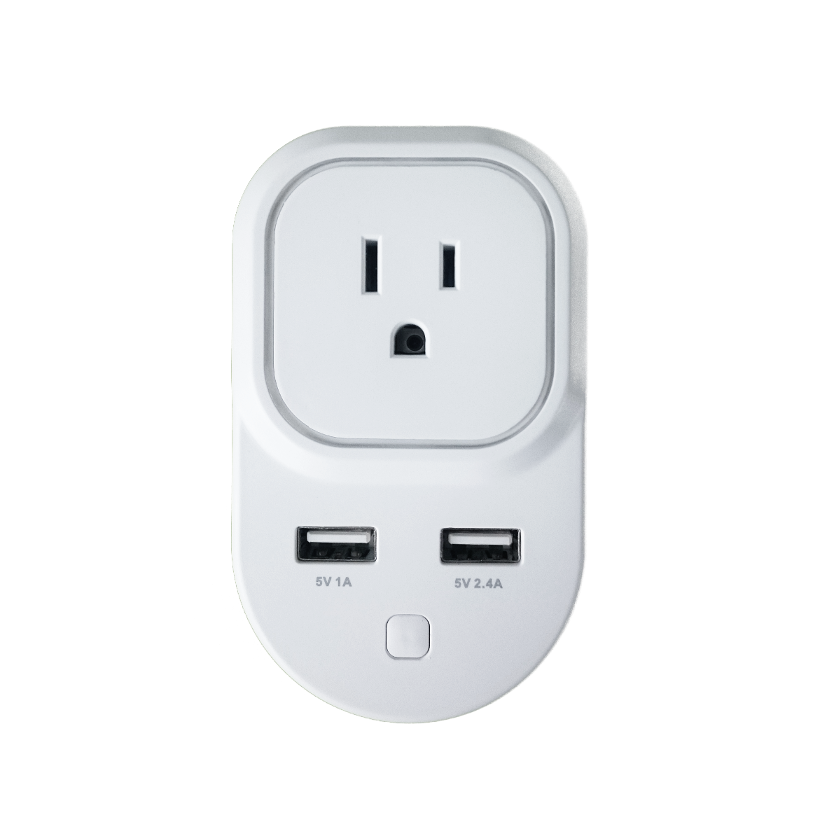
- Product features: - Manual and remote on / off control - Energy monitoring - Scene inclusion for custom automation scenarios when included to a Z-Wave gateway controller - LED indicator displaying Z-Wave signal strength and power usage - Security enabled Z-Wave device with AES signal encryption (requires a security enabled gateway controller for full functionality) - Z-Wave Plus with improved 500 chip for faster and safer wireless communication - Built-in range extender for a stronger, more reliable network - 2 USB charging ports for your smart phone or tablet (no Z-Wave functionality) - Built-in overload protection in Z-Wave outlet and USB ports Product Specifications: Model Number: ZEN06 Z-Wave Signal Frequency: 908.42 MHz Power: 110V, 60Hz Maximum Load: 15A, 1800W USB Charging Port Power: 1A and 2.4A Operating Temperature: 14 – 104 F Range: Up to 130 feet line of sight Installation and Use: Indoor only Dimensions: 4” x 2.5” x 1.2” Weight: 7oz
- Hardware platform
- ZM5101
- Short description
- Enjoy wireless control of floor lamps and small appliances. This product features energy monitoring in live mode or over time (your Z-Wave gateway needs to support this feature) and AES signal encryption. Z-Wave Plus chip guarantees faster and more reliable communication.
- Product identifier
- ZEN06
- Countries / regions
- United States of America
- Certification number
- ZC10-16085160
- Radio range z wave (m)
- 40
- Configuration parameters
- Parameter Number Name Description Format Size Min Value Max Value Default Value Parameter Values 151
- Supports explorer frames
- Yes
- Value white electric load type value incandescent fluorescent led firmware updatable value updatable by consumer by rf switch load capacity volt ampere value 110 switch load capacity watts value 1800 association groups
- Group Number Maximum Nodes Supported End Point ID Description 1
- From to description 1 65535 number of watts the appliance needs to go over for the change to be reported 0 0 disabled (it will not report power consumption based on value change) 172 energy report frequency choose how often you want your smart plug to report energy usage (kwh) to your controller and associated device. the number entered as value corresponds to the number of seconds. so if 300 is entered by default, the smart plug will report energy usage every 300 seconds (5 minutes). 0 4 0 0 300 from to description 5 2678400 number of seconds for the interval the smart plug will report energy usage 0 0 disabled (it will not report energy usage) 174 electricity report frequency choose how often you want your smart plug to report levels of electrical current (a) to your controller and associated device. the number entered as value corresponds to the number of seconds. 0 4 0 0 0 from to description 0 0 disabled (default – it will not report electrical current levels) 5 2678400 number of seconds for the interval the smart plug will report energy current 24 on/off status change notifications your smart plug will automatically send a notification to the controller and other associated devices if its status changes from on to off or the other way round. choose when you want it to send the report. 0 1 0 0 1 from to description 0 0 disabled (it will not send status change notifications) 1 1 sends notification if status is changed manually or remotely via z wave (default) 2 2 sends notification only if status is changed manually by pressing and releasing the z wave button on the smart plug 152 power report percentage threshold choose how you want your smart plug to report power consumption to your controller and associated devices by percentage rate. the number entered as value corresponds to the percentage in power usage change the appliance needs to go over for the event to be reported. so if 10% is entered by default, the smart plug will report any change in power consumption over 10% (whether it’s at least 10% more or 10% less power consumption compared to previous report). 0 1 0 0 10 from to description 1 255 percentage in power usage change the appliance needs to go over for the event to be reported 0 0 disabled (it will not report power consumption based on percentage change) 173 voltage report frequency choose how often you want your smart plug to report voltage (v) to your controller and associated device. the number entered as value corresponds to the number of seconds. 0 4 0 0 0 from to description 5 2678400 number of seconds for the interval the smart plug will report voltage 0 0 disabled (default – it will not report voltage levels) texts